Thursday, December 2, 2021

Recent Questions - Server Fault

Recent Questions - Server Fault


How do I fix issue with renewing my certbot certificates on ubuntu

Posted: 02 Dec 2021 02:56 AM PST

I am trying to renew my certbot certificates running the command cerbot renew and I get this error

2021-12-02 10:46:30,686:INFO:certbot.plugins.selection:Plugins selected: Authenticator nginx, Installer nginx  2021-12-02 10:46:30,779:DEBUG:acme.client:Sending GET request to https://acme-staging-v02.api.letsencrypt.org/directory.  2021-12-02 10:46:30,783:INFO:requests.packages.urllib3.connectionpool:Starting new HTTPS connection (1): acme-staging-v02.api.letsencrypt.org  2021-12-02 10:46:30,960:WARNING:certbot.renewal:Attempting to renew cert (ventureserp.com) from /etc/letsencrypt/renewal/ventureserp.com.conf produced an unexpected error: [SSL: CERTIFICATE_VERIFY_FAILED] certificate verify failed (_ssl.c:645). Skipping.  2021-12-02 10:46:30,975:DEBUG:certbot.renewal:Traceback was:  Traceback (most recent call last):    File "/usr/local/lib/python3.5/dist-packages/requests/packages/urllib3/connectionpool.py", line 595, in urlopen      chunked=chunked)    File "/usr/local/lib/python3.5/dist-packages/requests/packages/urllib3/connectionpool.py", line 352, in _make_request      self._validate_conn(conn)    File "/usr/local/lib/python3.5/dist-packages/requests/packages/urllib3/connectionpool.py", line 831, in _validate_conn      conn.connect()    File "/usr/local/lib/python3.5/dist-packages/requests/packages/urllib3/connection.py", line 289, in connect      ssl_version=resolved_ssl_version)    File "/usr/local/lib/python3.5/dist-packages/requests/packages/urllib3/util/ssl_.py", line 308, in ssl_wrap_socket      return context.wrap_socket(sock, server_hostname=server_hostname)    File "/usr/lib/python3.5/ssl.py", line 377, in wrap_socket      _context=self)    File "/usr/lib/python3.5/ssl.py", line 752, in __init__      self.do_handshake()    File "/usr/lib/python3.5/ssl.py", line 988, in do_handshake      self._sslobj.do_handshake()    File "/usr/lib/python3.5/ssl.py", line 633, in do_handshake      self._sslobj.do_handshake()  ssl.SSLError: [SSL: CERTIFICATE_VERIFY_FAILED] certificate verify failed (_ssl.c:645)  

When I run cerbot --version it gives me 0.31.0 which seems to be the latest version of certbot, so I am not really sure why this is happening? I have gone through numerous articles online and it didnt help my cause, please anyone who can kinldy help as this is urgent.

Solution for hosting a growable farm of different containers

Posted: 02 Dec 2021 02:54 AM PST

I'm trying to find a solution for the following criteria:

  • Run a dynamically sized farm/pool of containers
  • Grow capacity of the farm by simply adding more hosts with minimal housekeeping
  • Every container may be a different image
  • Number of instances per container is dynamic but usually 1
  • Running target state of containers needs to be monitored and enforced automatically

I know this requirement list potentially screams "k8", but I just hope there's a simpler technology.

Cannot make outbound connections with iptables set to allow all

Posted: 02 Dec 2021 02:51 AM PST

I cannot for the life of me figure out why the DROP winds up getting hit with outbound requests originating off my openvz based VPS.

I know it has to be something with how the packet isn't going directly outbound, or something, and I seem to be missing some basic thing here. I have tried various things, and the only way I can get it to work again is flushing the rules (iptables -F)

The goal is to block all incoming traffic, except from one IP (1.2.3.4) and port 53/113 to everyone, and allow all outbound.

Here's output of iptables -L -n -v - I can see DROP packet count go up when I try to curl outbound. (IPs slightly modified for privacy)

Chain INPUT (policy ACCEPT 0 packets, 0 bytes)   pkts bytes target     prot opt in     out     source               destination             239 17668 ACCEPT     all  --  *      *       1.2.3.4              0.0.0.0/0               118 11175 ACCEPT     udp  --  *      *       0.0.0.0/0            0.0.0.0/0            udp spt:53      3   174 ACCEPT     udp  --  *      *       0.0.0.0/0            0.0.0.0/0            udp dpt:53     17  1176 ACCEPT     tcp  --  *      *       0.0.0.0/0            0.0.0.0/0            tcp dpt:113      0     0 ACCEPT     all  --  lo     *       0.0.0.0/0            0.0.0.0/0              2238  119K DROP       all  --  *      *       0.0.0.0/0            0.0.0.0/0               Chain FORWARD (policy ACCEPT 0 packets, 0 bytes)   pkts bytes target     prot opt in     out     source               destination             Chain OUTPUT (policy ACCEPT 0 packets, 0 bytes)   pkts bytes target     prot opt in     out     source               destination             889 56648 ACCEPT     all  --  *      *       0.0.0.0/0            0.0.0.0/0             

this is from iptables-save (IPs slightly modified for privacy)

# Generated by iptables-save v1.8.4 on Thu Dec  2 02:42:40 2021  *filter  :INPUT ACCEPT [0:0]  :FORWARD ACCEPT [0:0]  :OUTPUT ACCEPT [0:0]  -A INPUT -s 1.2.3.4/32 -j ACCEPT  -A INPUT -p udp -m udp --sport 53 -j ACCEPT  -A INPUT -p udp -m udp --dport 53 -j ACCEPT  -A INPUT -p tcp -m tcp --dport 113 -j ACCEPT  -A INPUT -i lo -j ACCEPT  -A INPUT -j DROP  -A OUTPUT -j ACCEPT  COMMIT  # Completed on Thu Dec  2 02:42:40 2021  

these are the interfaces (IPs slightly modified for privacy)

venet0: flags=211<UP,BROADCAST,POINTOPOINT,RUNNING,NOARP>  mtu 1500          inet 127.0.0.1  netmask 255.255.255.255  broadcast 0.0.0.0  destination 127.0.0.1          inet6 2a00:d880:3:1::ad49:a3f2  prefixlen 128  scopeid 0x0<global>          inet6 2a00:d880:3:1::a639:a610  prefixlen 128  scopeid 0x0<global>    venet0:0: flags=211<UP,BROADCAST,POINTOPOINT,RUNNING,NOARP>  mtu 1500          inet 81.1.1.1  netmask 255.255.255.255  broadcast 81.1.1.1  destination 81.1.1.1  

How to clear Windows Server 2019 DNS suffix search list

Posted: 02 Dec 2021 02:43 AM PST

I have a Server 2019 which should be with a static IP address. By mistake a DHCP address was assigned to it once during installation and the DHCP also has set the DNS suffix search list.

When running ipconfig /all I see nycab in the DNS suffix list and it causes issues with some applications I have. Comparing to other servers who did not get a DHCP address when installing there the DNS suffix is empty.

    Windows IP Configuration       Host Name . . . . . . . . . . . . : xxxxxxxxxx     Primary Dns Suffix  . . . . . . . :     Node Type . . . . . . . . . . . . : Hybrid     IP Routing Enabled. . . . . . . . : No     WINS Proxy Enabled. . . . . . . . : No     DNS Suffix Search List. . . . . . : nycab    Ethernet adapter Ethernet0:       Connection-specific DNS Suffix  . : nycab     Description . . . . . . . . . . . : vmxnet3 Ethernet Adapter     Physical Address. . . . . . . . . : xxxxxxxxxx     DHCP Enabled. . . . . . . . . . . : No     Autoconfiguration Enabled . . . . : Yes     Link-local IPv6 Address . . . . . : fe80::908a:a2d3:4eba:8092%2(Preferred)     Autoconfiguration IPv4 Address. . : 169.254.128.146(Preferred)     Subnet Mask . . . . . . . . . . . : 255.255.0.0     Default Gateway . . . . . . . . . : fe80::92ec:77ff:fe0d:efed%2     DHCPv6 IAID . . . . . . . . . . . : 100666409     DHCPv6 Client DUID. . . . . . . . : 00-01-00-01-29-31-92-9C-00-0C-29-AE-C4-5A     DNS Servers . . . . . . . . . . . : xxxxx     NetBIOS over Tcpip. . . . . . . . : Enabled     Connection-specific DNS Suffix Search List :                                         nycab  

I have tried resetting the network, running various powershell commands and even resetting the whole TCP stack but nothing seems to clear this nycab value.

If I set in the NIC a specific value in the DNS suffix that value is displayed in ipconfig but when clearing it the value reverts back to nycab.

Short of re-installing windows, how can I clear the DNS suffix? I searched the entire registry and it does not appear anywhere

How to configure an Apache load balancing proxy with a hot standby BalancerMember

Posted: 02 Dec 2021 02:38 AM PST

I have two docker containers each with a running application on port 8080. This application has a REST endpoint "/status" that can signal if the application still has the resources to accept another request by a user. A user request will be forwarded and balanced to the two containers by an load balancing Apache proxy.

What I want to achieve:

  1. If the application in a container signals it doesn't want to receive more requests the balancer will not forward requests to this container
  2. If every running application server signals to not receive any requests one of those servers should receive the requests anyway.

What I've configured:

<VirtualHost *:80>      ProxyRequests off      ProxyPreserveHost On            ProxyHCExpr status_ok {hc('body') ~ /Status: ok/}            <Proxy balancer://application-cluster>              BalancerMember http://application1:8080 route=worker1 hcexpr=status_ok hcmethod=get hcuri=/status              BalancerMember http://application2:8080 route=worker2 hcexpr=status_ok hcmethod=get hcuri=/status              BalancerMember http://application1:8080 route=standby status=+H              ProxySet lbmethod=byrequests       </Proxy>            <Location /balancer-manager>              SetHandler balancer-manager      </Location>        ProxyPass /balancer-manager !        ProxyPass / balancer://application-cluster/      ProxyPassReverse / balancer://application-cluster/  </VirtualHost>  

As you can see here, application1 is definded as a hot standby and should be the "victim" to handle requests if all other BalanceMembers are "offline" for new requests

What works:

  • The requests are load balanced to both BalancerMembers.
  • application1 and application2 can signal to not receive any requests. In this case both BalancerMembers show the expected status "Init HcFl" on the the Balancer Manager page.

What doesn't work:

  • application1 doesn't show up as hot standby on the Balance Manager page
  • Therefore requests will not be forwarded to application1

What's possible but I don't want to do:

  • If I configure the hot standby to forward to another port on application1 it will show up and forward requests to this port.

It seems like Apache just removes a BalancerMember if host and port are equal to another BalancerMember. Do I miss something or is there another way to achieve what I want?

How to install packages from command line on Suse

Posted: 02 Dec 2021 02:28 AM PST

What is the Suse version of apt-get or yum? Or how do I get one of them installed in order to install software packages from the command line?

A fairly intense session of googling suggests that it may be yast or yast2, but no sensible HOWTO of listing and installing packages from the command line seems to exist. (maybe I am looking in the wrong place)

If I am an administrator for a remote Suse server, how do I install packages from the command line? (Not using a GUI and preferably installing from a central repo)

Does packages security patches are backported to older version?

Posted: 02 Dec 2021 02:27 AM PST

I see on cve.mitre.org that OpenLDAP (slapd) package have plenty of vulnerabilities prior to 2.4.57.

If I want to install OpenLDAP from official repositories on my Debian 10, which version is slapd/oldstable,oldstable 2.4.47+dfsg-3+deb10u6 amd64.

Do the security patches for those CVE are backported to this 2.4.47 version, or do I have to take the latest release (2.6.x) from the offcial website, and install it from the source to get rid of those CVE ?

Thank you.

DNS best practice for large resilience orientated org

Posted: 02 Dec 2021 01:55 AM PST

I have been asked to investigate the resiliency of our DNS and it's config. What's the industry best practice around this?

The following have been suggested: the DNSAdmin group (which is usually created by default when creating a domain) has been removed from all the DNS servers. I doubt this would cause any issues as there are no members in this group, however what's the easiest way to add it top level and for inheritance to work (tested it in a lab environment and inheritance didn't work).

Thanks.

Is it possible to host the database on one server, but the actual data on another?

Posted: 02 Dec 2021 02:36 AM PST

We're planning to do AI research using an HPC. This HPC will use datasets that we've created. These datasets are fairly big subsets of the entire dataset (~1TB). All the data we've gathered from experiments will be stored in an SQL database. We want to use SQL queries to fetch relevant subsets from the database which are relevant at a given time - so for that we've developed a RESTful service, which allows people to send sanitized queries.

There are some limitations that are currently halting our setup.

We have a host for the RESTful service, but using ~1TB storage on it is a bit of a last resort, and we'd prefer to find an alternative way to do things. I was wondering is it possible to host the database on one server, but have the actual data sit on another server? So that when the researcher sends a query to the RESTful service, the SQL server selects which files to send, returns them to the restful service, the restful service returns download links to all the datasets.

We're using MySQL at the moment to store the data, and an instance of Flask to allow researchers to submit new experiments, and fetch them.

E-Mail from Postfix Server goes to Spam for Gmail and Hotmail/Outlook: How can i correctly setup my PTR and rDNS and HELO?

Posted: 02 Dec 2021 01:16 AM PST

I know, that this Question has been asked SEVERAL times and I also know, that you have to do a lot of tweaking to make the e-mails not go into spam. However, I am having issues while setting up the PTR and rDNS and my HELO message and am getting desperate with my e-mails going to spam.

I setup a mailserver for my one and only domain on my VPS with its own IPv4-Address, which I own for over a year now. I registered the domain 6 days ago. Before that, I solely used this VPS for data-storage.

I will use following name-conventions in the following post:

My FQDN = webmail.mydomain.com

My domain = mydomain.com

I am using following tools, setup with Plesk Obsidian:

  • Postfix as my Mail-Server
  • Dovecot as my IMAP-Server
  • Roundcube as my Webmail software

GMail passes my DMARC, DKIM and SPF Headers:

SPF:    PASS mit IP-Adresse 81.XXX.XXX.XXX  DKIM:   'PASS' mit Domain My domain  DMARC:  'PASS'   

I think, that they are setup correctly, as the results of mail-tester says the same.

However, mail-tester also says, that my rDNS entry does not match my HELO message.

What I did was following:

  • I setup a rDNS at my VPS provider to my FQDN (my MX records point to my FQDN)
  • I setup a PTR record at CloudFlare (as I use CloudFlare NS for my Domain) which points my IPv4 address to my FQDN
  • I disabled every DNS Proxy functionality within CloudFlare
  • I changed my hostname of my VPS to my FQDN
  • I changed $myhostname in /etc/postfix/main.cf to my FQDN
  • I also tried commenting out the $myhostname variable completely and checked, that it wasn't used somewhere else in the config file, didn't help either
  • I changed my smtpd_banner to webmail.mydomain.com ESMTP $mail_name (Ubuntu)

and still mail-tester says the following:

Your IP address 81.xxx.xxx.xxx is associated with the domain webmail.mydomain.com. Nevertheless your message appears to be sent from mydomain.com.

You may want to publish a pointer (PTR type) DNS record with a value of mydomain.com or use webmail.mydomain.com as hostname in your mail software

Here are the tested values for this check:

IP: 81.XXX.XXX.XXX

HELO: mydomain.com

rDNS: webmail.mydomain.com

Shouldn't my HELO be the FQDN after all these changes? It still appears to be my domain instead of my fqdn

I read in several resources, that mails go into Spam, if you don't use a FQDN as your rDNS. They also should match up with the HELO, however, the HELO doesn't change in my case.

I am so sorry, I know, that these types of questions are getting asked A LOT on here, however, I tried everything I read on this and several other forums, my mails always still go to spam in Gmail and Outlook.

What is the relation between host.conf and resolv.conf

Posted: 02 Dec 2021 01:13 AM PST

I am using ubuntu. I see the following information from the manpage:

  • For /etc/host.conf (man host.conf)

    host.conf - resolver configuration file

    The file /etc/host.conf contains configuration information specific to the resolver library.

  • For /etc/resolv.conf (man resolv.conf)

    resolv.conf - resolver configuration file

    The resolver is a set of routines in the C library that provide access to the Internet Domain Name System (DNS).

Does the resolver use both files, in which order and what are the differences?

How to debug FAILED - RETRYING: wait for hosts (12 retries left)

Posted: 02 Dec 2021 12:55 AM PST

Trying to deploy a VM landscape using https://github.com/GoogleCloudPlatform/sap-deployment-automation, I often get the message:

FAILED - RETRYING: wait for hosts (12 retries left).  

It usually repeats failing, and I resolve it by trying various things to enable ssh access. But this time I would like to get some ideas how to make it better than blindly trying.

How can I debug Terraform?

Can I use a terminal server as it's own license server?

Posted: 02 Dec 2021 12:55 AM PST

I'm currently setting up a Windows Terminal Server (Windows Server 2022) for our employees and I've been wondering:

I know that for a terminal server you need a license server with a RDS User CAL or RDS Computer CAL licenses.

My question is: Do I need a separate license server or can I run the license server on the terminal server itself?

Stress test a server running on the local machine?

Posted: 02 Dec 2021 12:42 AM PST

I tried searching around and everything gives me completely different answers

I'm comparing nginx and a proprietary server my boss wants to use. We're trying to figure out if it's a lot slower or roughly the same. Both are http servers (we don't care about https unfortunately but I'd like to check for that too)

I suspect we'll want to know number of simultaneous connections (how many can make a request every few seconds, data throughput (file transfers or dummy generated data to mock large API response) and request per second

I'm not sure if I need to know more information than that (do you have any recommendations?) but I would expect there's some open source software I can use that checks for these and generates a report?

Rolling updates of backend with udp server sockets

Posted: 02 Dec 2021 01:20 AM PST

I have a backend system used for IOT devices which use UDP protocol for communications. And there are certain TCP (HTTP2) based APIs for mobile apps from the same backend.

I am trying to build a rolling update feature to enable 0 downtime patching of the backend services.

My setup is like this.

Instead of directly exposing the sockets to the apps, I am trying to do transparent proxy to my processes. I have exposed 2 sockets (1 udp and 1 tcp) to the public internet using firewall.

My production server is opening different set of ports for udp and tcp (which are changeable via environment variables without changing the underlying binary).

Step 1:

enter image description here

I am trying to create transparent proxy in the same machine from udp port 16002 to 17002. For udp, my server will also initiate some communication with the devices in the wild. Server should see the source IP/port as well as communicate back with these devices which could be under some NATs (typically, WiFi router) by respecting same origin policy of the NATs.

And same for tcp. From port 16012 to port 17012. This is the typical deployment by externalizing the real ports.

I am not able to make this work.

Step 2:

Whenever there is new code to be patched, I want to bring up the new code on two different set of ports as shown in the below picture (P2 - Process 2).

When process 2 is up and running, I will change the IP address mapping to the new Process (P2). After giving certain time for P1 to finish off any pending IO operations, we will bring down the Process P1.

For the next patch, we will bring up P1' and the process inverses.

enter image description here

Is there any flaw in this design? Can this be achieved technically by using iptables and tproxy or any other linux tools?

I have considered building an L7 router and relaying the packets back and forth by defining high level objects. But I am curious if this can be done using low level routing L3/L4 since it can be more efficient and battle tested. For sure, these nft, iptables tools have usability issues and not very intuitive, especially nft, for a developer.

Let an unattended script connect from windows to an applaince with ssh password

Posted: 02 Dec 2021 12:42 AM PST

I'm creating a script that will run unnatended on Windows. The script needs to execute commands via SSH on an appliance. The appliance does not support public/private key authentication only password authentication is supported. The script will need to execute some commands via SSH and capture the results (via stdout). The script will be run on Windows and will use built-in Windows SSH Client, this is preferred for the compliance reason, but if a different client can do the job I would also like to know.

I need a way to bypass the password propmpt, so that the password is supplied by the script. How can this be achieved?

What I have considered:

  • Public Key Authentication - is not supported by the appliance
  • Use putty - needs to be completelly unattended
  • sshpass - does not work on windows
  • WSL - requires Hyper-V and the machine has VmWare on it which is incompatible, also was hoping for something simpler

Endless redirect loop on nginx config

Posted: 01 Dec 2021 11:51 PM PST

I have an nginx config with SSL configured and two redirects to docker container. One of them (edit https://psono.example.com/portal) is working, but the one that forwards the domain itself (edit https://psono.example.com/) is not working and instead leads to an endless redirect (https://psono.example.com/psono.example.com/psono.example.com/psono.example.com/psono.example.com/...)

This is my config.

server {      listen 80;      server_name psono.example.com;      return 301 https://$host$request_uri;  }    server {      listen 443 ssl http2;      server_name psono.example.com;          ssl_protocols TLSv1.2;      ssl_prefer_server_ciphers on;      ssl_session_cache shared:SSL:10m;      ssl_session_tickets off;      ssl_stapling on;      ssl_stapling_verify on;      ssl_session_timeout 1d;      resolver 8.8.8.8 8.8.4.4 valid=300s;      resolver_timeout 5s;      ssl_ciphers '';        # Comment this in if you know what you are doing      # add_header Strict-Transport-Security "max-age=63072000; includeSubdomains; preload";        add_header Referrer-Policy same-origin;      add_header X-Frame-Options DENY;      add_header X-Content-Type-Options nosniff;      add_header X-XSS-Protection "1; mode=block";        # If you have the admin fileserver installed too behind this reverse proxy domain, add your fileserver URL e.g. https://fs01.example.com as connect-src too:      add_header Content-Security-Policy "default-src 'none';  manifest-src 'self'; connect-src 'self' https://static.psono.com https://api.pwnedpasswords.com https://storage.googleapis.com https://*.digitaloceanspaces.com https://*.blob.core.windows.net https://*.s3.amazonaws.com; font-src 'self'; img-src 'self' data:; script-src 'self'; style-src 'self' 'unsafe-inline'; object-src 'self'";        ssl_certificate /etc/letsencrypt/live/psono.example.com/fullchain.pem;      ssl_certificate_key /etc/letsencrypt/live/psono.example.com/privkey.pem;        client_max_body_size 256m;        gzip on;      gzip_disable "msie6";        gzip_vary on;      gzip_proxied any;      gzip_comp_level 6;      gzip_buffers 16 8k;      gzip_http_version 1.1;      gzip_min_length 256;      gzip_types text/plain text/css application/json application/x-javascript application/javascript text/xml application/xml application/xml+rss text/javascript application/vnd.ms-fontobject application/x-font-ttf font/opentype image/svg+xml image/x-icon;            root /var/www/html;            location /server {                  rewrite ^/server/(.*) /$1 break;                  proxy_set_header        Host $host;                  proxy_set_header        X-Real-IP $remote_addr;                  proxy_set_header        X-Forwarded-For $proxy_add_x_forwarded_for;                  proxy_set_header        X-Forwarded-Proto $scheme;            add_header Last-Modified $date_gmt;          add_header Pragma "no-cache";          add_header Cache-Control "private, max-age=0, no-cache, no-store";          if_modified_since off;          expires off;          etag off;                        proxy_pass          http://localhost:10100;      }            location ~* ^/portal.*\.(?:ico|css|js|gif|jpe?g|png|eot|woff|woff2|ttf|svg|otf)$ {          expires 30d;          add_header Pragma public;          add_header Cache-Control "public";            # Remove the leading # from the following lines if you have the admin webclient running in a docker container          proxy_set_header        Host $host;          proxy_set_header        X-Real-IP $remote_addr;          proxy_set_header        X-Forwarded-For $proxy_add_x_forwarded_for;          proxy_set_header        X-Forwarded-Proto $scheme;            proxy_pass          http://localhost:10102;          proxy_redirect      http://localhost:10102 https://psono.example.com;      }   location ~* \.(?:ico|css|js|gif|jpe?g|png|eot|woff|woff2|ttf|svg|otf)$ {          expires 30d;          add_header Pragma public;          add_header Cache-Control "public";                # Remove the leading # from following lines if you have the webclient running in a docker container          proxy_set_header        Host $host;          proxy_set_header        X-Real-IP $remote_addr;          proxy_set_header        X-Forwarded-For $proxy_add_x_forwarded_for;          proxy_set_header        X-Forwarded-Proto $scheme;            proxy_pass          http://localhost:10101;          proxy_redirect      http://localhost:10101 https://psono.example.com;      }            # Remove the leading # from following lines if you have the admin webclient running in a docker container       location /portal {                  proxy_set_header        Host $host;                  proxy_set_header        X-Real-IP $remote_addr;                  proxy_set_header        X-Forwarded-For $proxy_add_x_forwarded_for;                  proxy_set_header        X-Forwarded-Proto $scheme;                    proxy_read_timeout  90;                    proxy_pass          http://localhost:10102;       }            # Remove the leading # from following lines if you have the admin webclient NOT running in a docker container      # location /portal {      #     index  index.html index.htm;      #     try_files $uri /portal/index.html;  # forward all requests to index.html      # }            # Remove the leading # from following lines if you have the webclient running in a docker container      location / {                  proxy_set_header        Host $host;                  proxy_set_header        X-Real-IP $remote_addr;                  proxy_set_header        X-Forwarded-For $proxy_add_x_forwarded_for;                  proxy_set_header        X-Forwarded-Proto $scheme;                    proxy_pass          http://localhost:10101;                  proxy_read_timeout  90;          #                  proxy_redirect      http://localhost:10101 https://psono.example.com;      }  }    

Edit The output of curl -v is:

  *   Trying 5.9.74.183:443...  * TCP_NODELAY set  * Connected to psono.example.com (5.9.74.183) port 443 (#0)  * ALPN, offering h2  * ALPN, offering http/1.1  * successfully set certificate verify locations:  *   CAfile: /etc/ssl/certs/ca-certificates.crt    CApath: /etc/ssl/certs  * TLSv1.3 (OUT), TLS handshake, Client hello (1):  * TLSv1.3 (IN), TLS handshake, Server hello (2):  * TLSv1.2 (IN), TLS handshake, Certificate (11):  * TLSv1.2 (IN), TLS handshake, Server key exchange (12):  * TLSv1.2 (IN), TLS handshake, Server finished (14):  * TLSv1.2 (OUT), TLS handshake, Client key exchange (16):  * TLSv1.2 (OUT), TLS change cipher, Change cipher spec (1):  * TLSv1.2 (OUT), TLS handshake, Finished (20):  * TLSv1.2 (IN), TLS handshake, Finished (20):  * SSL connection using TLSv1.2 / ECDHE-RSA-AES256-GCM-SHA384  * ALPN, server accepted to use h2  * Server certificate:  *  subject: CN=psono.example.com  *  start date: Dec  1 14:53:24 2021 GMT  *  expire date: Mar  1 14:53:23 2022 GMT  *  subjectAltName: host "psono.example.com" matched cert's "psono.example.com"  *  issuer: C=US; O=Let's Encrypt; CN=R3  *  SSL certificate verify ok.  * Using HTTP2, server supports multi-use  * Connection state changed (HTTP/2 confirmed)  * Copying HTTP/2 data in stream buffer to connection buffer after upgrade: len=0  * Using Stream ID: 1 (easy handle 0x557ac8936e10)  > GET / HTTP/2  > Host: psono.example.com  > user-agent: curl/7.68.0  > accept: */*  >  * Connection state changed (MAX_CONCURRENT_STREAMS == 128)!  < HTTP/2 403  < server: nginx/1.18.0 (Ubuntu)  < date: Thu, 02 Dec 2021 06:53:11 GMT  < content-type: text/html  < content-length: 162  <  <html>  <head><title>403 Forbidden</title></head>  <body>  <center><h1>403 Forbidden</h1></center>  <hr><center>nginx/1.18.0 (Ubuntu)</center>  </body>  </html>    

How to find Free IP address in a sub range?

Posted: 01 Dec 2021 11:42 PM PST

We are using below command to figure out the IP addresses which are down (which is free IP address to use)

nmap -v -sn -n 192.168.1.0/24 -oG - | awk '/Status: Down/{print $2}'  

I wanted to get a subrange within that . For example the above command shows all the free IP address from 192.168.1.1 to 192.168.1.124. [ Note: This is for test automation and we are using static IP addresses. Multiple team members are sharing range of IP addresses but often overstep other's range. So this will help us to decide whether IP is really free at that moment before using it)

But I want to find free IP address within the range of

192.168.1.55 to 192.168.1.65

. How to do it?

Running certbot on an ECS instance

Posted: 02 Dec 2021 02:01 AM PST

I am trying to run certbot on an ECS instance which is running a docker image (docker.io/existdb/teipublisher). The image runs well and I have associated it with a custom subdomain teipub.dh-dev.com using an elastic IP.

Trying to install and run certbot so I can have an Https connection has proven to be surprisingly difficult.

running as root, I install nginx with:

sudo amazon-linux-extras list | grep nginx  sudo amazon-linux-extras enable nginx1  sudo yum clean metadata  sudo yum -y install nginx  

then, following this from nginx I create /etc/nginx/conf.d/teipub.dh-dev.com.conf with the content:

server {      listen 80 default_server;      listen [::]:80 default_server;      root /var/www/html;      server_name teipub.dh-dev.com;  }  

but now when running sudo nginx -c /etc/nginx/nginx.conf to reload the new configuration I get enter image description here

Which makes sense to me because when I built the task definition to run my image on the ECS cluster I used a portMapping between the hostPorts 80 and 443 and the corresponding containerPorts, which means something is already listening on port 80 (as well as 443).

running sudo systemctl status nginx, sudo systemctl status httpd or sudo systemctl status apache2 on a clean ECS EC2 instance that is running the docker image cannot find those services. So nginx is not installed let alone running before I try to run it.

So my question is: isn't there already a webserver on the ECS instance? What is it and can I install the certbot on it? Or else, what is listening on port 80?

Alternatively - is there a different way to use certbot on an ECS instance?

BTW, and I don't think this is relevant, my main domain (dh-dev.com and www.dh-dev.com) allows https connections, probably through a certificate supplied by my hosting provider.

===Update===

following @dave_thompson_085's comment, I now understand (see image below) that a process called docker-proxy is listening on ports 80 and 443. Which is why I cannot use nginx to configure certbot on these ports. Any ideas on how to progress most welcome...

enter image description here

OpenVPN Layer 2 Ethernet Bridging

Posted: 02 Dec 2021 12:05 AM PST

I have an OpenVPN server running on an Ubuntu 18.04 machine and I want to connect to the server using an Ubuntu 20.04 machine through ethernet bridging (layer 2).

I have successfully created the OpenVPN, but i cannot seem to connect to it.

The tap0 in my client side does not receive an IP.

I would also like to state that I am new to networking and such.

My end goal would be having a STATIC IP ADDRESS for both the server and client. I do not want to use DHCP.

The following are my configs:

Server.conf

port 1194  proto udp  dev tap0  ca ca.crt  cert server.crt  key server.key  # This file should be kept secret  dh dh2048.pem    up "/etc/openvpn/up.sh br0 tap0 1500"  down "/etc/openvpn/down.sh br0 tap0"    # Configure server mode for ethernet bridging.  # You must first use your OS's bridging capability  # to bridge the TAP interface with the ethernet  # NIC interface.  Then you must manually set the  # IP/netmask on the bridge interface, here we  # assume 10.8.0.4/255.255.255.0.  Finally we  # must set aside an IP range in this subnet  # (start=10.8.0.50 end=10.8.0.100) to allocate  # to connecting clients.  Leave this line commented  # out unless you are ethernet bridging.  ;server-bridge 10.8.0.4 255.255.255.0 10.8.0.50 10.8.0.100    # Configure server mode for ethernet bridging  # using a DHCP-proxy, where clients talk  # to the OpenVPN server-side DHCP server  # to receive their IP address allocation  # and DNS server addresses.  You must first use  # your OS's bridging capability to bridge the TAP  # interface with the ethernet NIC interface.  # Note: this mode only works on clients (such as  # Windows), where the client-side TAP adapter is  # bound to a DHCP client.  server-bridge    keepalive 10 120  tls-auth ta.key 0 # This file is secret  cipher AES-256-CBC  persist-key  persist-tun  status /var/log/openvpn/openvpn-status.log  verb 3  explicit-exit-notify 1  

Client.ovpn

client  dev tap  proto udp  remote hidden 1194  resolv-retry infinite  nobind  user nobody  group nogroup  persist-key  persist-tun    <ca>  -----BEGIN CERTIFICATE-----  -----END CERTIFICATE-----  </ca>    <cert>  -----BEGIN CERTIFICATE-----  -----END CERTIFICATE-----  </cert>    <key>  -----BEGIN PRIVATE KEY-----  -----END PRIVATE KEY-----  </key>    remote-cert-tls server    key-direction 1  <tls-auth>  -----BEGIN OpenVPN Static key V1-----  -----END OpenVPN Static key V1-----  </tls-auth>    cipher AES-256-CBC  verb 4  

Clamav is very slow with tcp

Posted: 02 Dec 2021 12:13 AM PST

I'm using clamonacc on my desktop computer and servers. I use a raspberry pi as clamd server. The clamd process only uses ~25% of all 4 cores so with htop I see it's using like ~100% and 400% is the maximum a process could use because the raspberry pi has 4 cores. RAM isn't full and there isn't much i/o wait (according to htop)

I'm currently testing clamonacc on one server but the clamonacc queue fills up until it's limit (too many opened files) I only have these problems if I use a dedicated clamd server - with the socket it doesn't fill up the queue often.

There's always only one clamd thread (two if I look with clamdtop because clamdtop needs another one) on the raspberry pi.

I think that the tcp connection makes all slower. The traffic goes through a switch from my server with clamonacc to my raspberry pi clamd server - but that shouldn't be a problem. htop says that there's ~7MB/s (3000/8000 packets)

The raspberry pi isn't the problem because I used another device and it still didn't work

How can I fix this?

Both systems have ubuntu installed. Clamav version: 0.103.3

btw, clamdscan doesn't seem to have problems but it's slower through tcp

edit: I got it.. The problem's like you would run clamav under root but you don't exclude root so it's scanning in a loop. I use clamonaccess mount-path / to scan my system. The problem is that even if I exclude both, clamav and root, it will still scan in a loop. If I change to a local socket it wont scan in a loop but if I use a dedicated clamd server it does

Is this a bug by clamav?

Adminer or mysql error: no connection could be made because the target machine actively refused it

Posted: 02 Dec 2021 02:05 AM PST

I have been trying to set up wordpress.org using localbyflywheel, but when I open Adminer I keep getting this error: No connection could be made because the target machine actively refused it, what can I do to solve this error?

I am running MySQL on the same machine I installed Wordpress and I'm using Local by Flywheel instead of MAMP as the development environment. The MySQL service is up. Do I need to change anything in the config file?

Added info from comments

TCP 0.0.0.0:135 TCP 0.0.0.0:445 TCP 0.0.0.0:1801 TCP 0.0.0.0:2103 0.0.0.0:0 TCP 0.0.0.0:2105 0.0.0.0:0 TCP 0.0.0.0:2107 0.0.0.0:0 TCP 0.0.0.0:2869 0.0.0.0:0 TCP 0.0.0.0:3306 TCP 0.0.0.0:5040 TCP 0.0.0.0:5357 TCP 0.0.0.0:12666 TCP 0.0.0.0:49664 TCP 0.0.0.0:49665 TCP 0.0.0.0:49666 TCP 0.0.0.0:49667 TCP 0.0.0.0:49668 TCP 0.0.0.0:49677 TCP 0.0.0.0:49678 TCP 0.0.0.0:49896 TCP 127.0.0.1:4001 TCP 127.0.0.1:5354 TCP 127.0.0.1:16920

error message

Active connections

BitLocker with TPM: how to replace the numerical password recovery key protector with an alphanumeric password recovery key protector?

Posted: 02 Dec 2021 12:01 AM PST

C:\Windows\system32>manage-bde -status  BitLocker Drive Encryption: Configuration Tool version 10.0.17763  Copyright (C) 2013 Microsoft Corporation. All rights reserved.    Disk volumes that can be protected with  BitLocker Drive Encryption:  Volume C: [OS]  [OS Volume]    Size:                 77.62 GB  BitLocker Version:    2.0  Conversion Status:    Fully Encrypted  Percentage Encrypted: 100.0%  Encryption Method:    XTS-AES 128  Protection Status:    Protection On  Lock Status:          Unlocked  Identification Field: Unknown  Key Protectors:      TPM      Numerical Password      C:\Windows\system32>  

Can I replace the numerical password key protector with an alphanumeric password protector since they're more secure (more possible permutations with all characters instead of just numbers 0-9)?

Can ping NAS by ip and hostname in Windows 10 console, but not find by ip or hostname in Windows explorer

Posted: 02 Dec 2021 12:01 AM PST

I have set up a new PC with Windows 10. Now I want to access two local NAS drives but can't connect to them. With my old PC and all coworkers pcs everything is fine. There is no special access restriction. I also can't see them in the network overview. I am in the same network group and use the same credentials as on my old pc. Weird is that I can connect to our servers harddrive which is no NAS and its within the same network as the NAS.

I can ping it in the console via hostname and ip address but when i try to access it in windows via the explorer it can't be found. I added the ip to the local hosts file, but it didn't solved the problem:

192.168.1.5 NASDAILY

What i found out so far:

ping NASDAILY -n 1 // Is working ping -6 NASDAILY -n 1 // Not working

On the command "ipconfig /displaydns" i get this:

nasdaily

Keine Einträge vom Typ AAAA

nasdaily

Eintragsname . . . . . : NASDAILY

Eintragstyp . . . . . : 1

Gültigkeitsdauer . . . : 86400

Datenlänge . . . . . . : 4

Abschnitt. . . . . . . : Antwort

(Host-)A-Eintrag . . : 192.168.1.5

I turned off the pc several times, reset the network connection, turned off firewall, turned of ipv6, nothing helped so far.

How to route default destination not via VPN tunnel?

Posted: 02 Dec 2021 02:05 AM PST

There a millions of sites which describe how to configure the network routing to send all traffic through the VPN tunnel. However, what is the exact opposite?

There is an OpenVPN server configured on the pfSense firewall, and only certain destinations should pass the VPN tunnel. The default route should not use the tunnel.

route -n  Ziel    Router       Genmask    Flags Metric Ref Use Iface  0.0.0.0 192.168.x.x  0.0.0.0    UG    50     0   0   tun0  0.0.0.0 192.168.y.y  0.0.0.0    UG    600    0   0   wlp2s0  

(Obvisouly, either 1st line is too much or its Metric should be >600).

I want this to be set in Linux Networkmanager and Windows 10. How to do that? PfSense can only force the default gateway to point to the tunnel, so I think that the decision of not using the tunnel for the default route is up to the client.

PXE boot cannot find syslinux config file, where is it looking?

Posted: 02 Dec 2021 01:04 AM PST

I am running a PXE server mock up in VMware Workstation. I have the DHCP and TFTP servers working and I can get my to grab an IP address and boot the firmware for their platform.

Where I seem to be running into trouble is all clients are failing to find the configuration file for syslinux. I intend on using multiple platforms so I have each platform in its own folder.

Here is my structure; File tree

This is the error I am receiveing from the clients; PXE Error

From what I have read on the syslinux wiki it says the bootloader will try looking for a config file in a specific order.

Config file order

I am pretty sure its something to do with my configuration that is causing the failure. The issue I am stumped on what it would be. Since my each platform has its own folder I am think the context of `/mybootdir' has changed. The question is to what? You can see in the file tree I tried making a symlink as a workaround but it did not seem to make any difference.

Any ideas what is wrong?

UPDATE

Here is what my DHCP config looks like; I copied some of it from a few examples I found on how to boot different platforms from the same DHCP scope and made it my own.

DHCP Config

VSFTPD Cant perform anon uploads. 500 OOPS

Posted: 02 Dec 2021 01:04 AM PST

I can't get my vsftpd config to allow anon root uploads.

$ vsftpd -v  $ vsftpd: version 3.0.2    $ cat /etc/vsftpd.conf  # Example config file /etc/vsftpd.conf  #  # The default compiled in settings are fairly paranoid. This sample file  # loosens things up a bit, to make the ftp daemon more usable.  # Please see vsftpd.conf.5 for all compiled in defaults.  #  # READ THIS: This example file is NOT an exhaustive list of vsftpd options.  # Please read the vsftpd.conf.5 manual page to get a full idea of vsftpd's  # capabilities.  #  #  # Run standalone?  vsftpd can run either from an inetd or as a standalone  # daemon started from an initscript.  listen=YES  #  # Run standalone with IPv6?  # Like the listen parameter, except vsftpd will listen on an IPv6 socket  # instead of an IPv4 one. This parameter and the listen parameter are mutually  # exclusive.  #listen_ipv6=YES  #  # Allow anonymous FTP? (Disabled by default)  anonymous_enable=YES  #  # Uncomment this to allow local users to log in.  local_enable=NO  #  # Uncomment this to enable any form of FTP write command.  write_enable=YES  #  # Default umask for local users is 077. You may wish to change this to 022,  # if your users expect that (022 is used by most other ftpd's)  #local_umask=022  #  # Uncomment this to allow the anonymous FTP user to upload files. This only  # has an effect if the above global write enable is activated. Also, you will  # obviously need to create a directory writable by the FTP user.  anon_upload_enable=YES  #  # Uncomment this if you want the anonymous FTP user to be able to create  # new directories.  anon_mkdir_write_enable=YES  #  # Activate directory messages - messages given to remote users when they  # go into a certain directory.  dirmessage_enable=YES  #  # If enabled, vsftpd will display directory listings with the time  # in  your  local  time  zone.  The default is to display GMT. The  # times returned by the MDTM FTP command are also affected by this  # option.  use_localtime=YES  #  # Activate logging of uploads/downloads.  xferlog_enable=YES  #  # Make sure PORT transfer connections originate from port 20 (ftp-data).  connect_from_port_20=YES  #  # If you want, you can arrange for uploaded anonymous files to be owned by  # a different user. Note! Using "root" for uploaded files is not  # recommended!  chown_uploads=YES  chown_username=ftpsecure  #  # You may override where the log file goes if you like. The default is shown  # below.  #xferlog_file=/var/log/vsftpd.log  #  # If you want, you can have your log file in standard ftpd xferlog format.  # Note that the default log file location is /var/log/xferlog in this case.  #xferlog_std_format=YES  #  # You may change the default value for timing out an idle session.  #idle_session_timeout=600  #  # You may change the default value for timing out a data connection.  #data_connection_timeout=120  #  # It is recommended that you define on your system a unique user which the  # ftp server can use as a totally isolated and unprivileged user.  nopriv_user=nobody  #  # Enable this and the server will recognise asynchronous ABOR requests. Not  # recommended for security (the code is non-trivial). Not enabling it,  # however, may confuse older FTP clients.  #async_abor_enable=YES  #  # By default the server will pretend to allow ASCII mode but in fact ignore  # the request. Turn on the below options to have the server actually do ASCII  # mangling on files when in ASCII mode.  # Beware that on some FTP servers, ASCII support allows a denial of service  # attack (DoS) via the command "SIZE /big/file" in ASCII mode. vsftpd  # predicted this attack and has always been safe, reporting the size of the  # raw file.  # ASCII mangling is a horrible feature of the protocol.  #ascii_upload_enable=YES  #ascii_download_enable=YES  #  # You may fully customise the login banner string:  ftpd_banner=Welcome to James Woods ftp server. Please don't commit any unauthorized uploads. All content is logged.  #  # You may specify a file of disallowed anonymous e-mail addresses. Apparently  # useful for combatting certain DoS attacks.  #deny_email_enable=YES  # (default follows)  #banned_email_file=/etc/vsftpd.banned_emails  #  # You may restrict local users to their home directories.  See the FAQ for  # the possible risks in this before using chroot_local_user or  # chroot_list_enable below.  #chroot_local_user=YES  #  # You may specify an explicit list of local users to chroot() to their home  # directory. If chroot_local_user is YES, then this list becomes a list of  # users to NOT chroot().  # (Warning! chroot'ing can be very dangerous. If using chroot, make sure that  # the user does not have write access to the top level directory within the  # chroot)  #chroot_local_user=YES  #chroot_list_enable=YES  # (default follows)  #chroot_list_file=/etc/vsftpd.chroot_list  #  # You may activate the "-R" option to the builtin ls. This is disabled by  # default to avoid remote users being able to cause excessive I/O on large  # sites. However, some broken FTP clients such as "ncftp" and "mirror" assume  # the presence of the "-R" option, so there is a strong case for enabling it.  #ls_recurse_enable=YES  #  # Customization  #  # Some of vsftpd's settings don't fit the filesystem layout by  # default.  #  # This option should be the name of a directory which is empty.  Also, the  # directory should not be writable by the ftp user. This directory is used  # as a secure chroot() jail at times vsftpd does not require filesystem  # access.  secure_chroot_dir=/var/run/vsftpd/empty  #  # This string is the name of the PAM service vsftpd will use.  pam_service_name=vsftpd  #  # This option specifies the location of the RSA certificate to use for SSL  # encrypted connections.  rsa_cert_file=/etc/ssl/certs/ssl-cert-snakeoil.pem  # This option specifies the location of the RSA key to use for SSL  # encrypted connections.  rsa_private_key_file=/etc/ssl/private/ssl-cert-snakeoil.key      #### Added by James Woods  #  delete_failed_uploads=YES  no_anon_password=YES  anon_root=/home/ftpsecure/anon  allow_writeable_chroot=YES  

Yet I'm still getting the error: Response: 500 OOPS: vsftpd: refusing to run with writable root inside chroot()

Any suggestions to solve this. I don't want to use vsftpd-ext or the Frontier Groups back-ported version. I'm currently using an anon subdirectory as a workaround but would like users to be able to create their own subdirectories from ftp clients.

How do I create DNS entries for EC2 instances created by Auto Scaling?

Posted: 02 Dec 2021 02:03 AM PST

I'm looking into using auto scaling groups for a tier of webservers that would be fronted by an ELB. One of the things I'm having a hard time with is how to give each new instance the proper DNS name. For example, I'd like webservers to have names like frontend-web-XXX.prod.example.com so their names would appear correct in logs and just ease of organization. I have two other tiers I'd ultimately like to make autoscaled and I'd like them to have names like api-web-XXX.prod.example.com as well. I have some experience with cloudformation templates and have spun up individual instances with associated Route53 records but I don't see any indication of how this can be done within an autoscaled group.

Is STARTTLS less safe than TLS/SSL?

Posted: 02 Dec 2021 01:23 AM PST

In Thunderbird (and I assume in many other clients, too) I have the option to choose between "SSL/TLS" and "STARTTLS".

As far as I understand it, "STARTTLS" means in simple words "encrypt if both ends support TLS, otherwise don't encrypt the transfer". And "SSL/TLS" means in simple words "always encrypt or don't connect at all". Is this correct?

Or in other words:

Is STARTTLS less secure than SSL/TLS, because it can fallback to plaintext without notifying me?

Setting an SPF record for all subdomains of my domain

Posted: 02 Dec 2021 02:11 AM PST

Is this possible? Like a wildcard TXT record of some sort?

Wednesday, December 1, 2021

OSCHINA 社区最新专区文章

OSCHINA 社区最新专区文章


StratoVirt vCPU管理Rust线程同步的实现

Posted: 30 Nov 2021 02:00 AM PST

StratoVirt是开源在openEuler社区的轻量级虚拟化平台,具备轻量低噪、强安全性的行业竞争力。 StratoVirt进程运行在用户态,在虚拟机启动之前,StratoVirt会完成启动之前的准备工作,包括虚拟机内存的初始化、CPU寄存器初始化、设备初始化等,启动,CPU寄存器初始化和虚拟机在运行过程中vCPU陷出事件的处理,都是由Strat...

看FusionInsight Spark如何支持JDBCServer的多实例特性

Posted: 30 Nov 2021 10:31 PM PST

摘要:采用多主实例模式的HA方案,不仅可以规避主备切换服务中断的问题,实现服务不中断或少中断,还可以通过横向扩展集群来提高并发能力。 本文分享自华为云社区《FusionInsight Spark支持JDBCServer的多实例特性介绍》,作者: 一枚核桃。 基于社区已有的JDBCServer基础上,采用多主实例模式实现了其高可用性方案。集群...

面试官:Java 线程如何启动的?

Posted: 30 Nov 2021 06:49 PM PST

摘要:Java 的线程创建和启动非常简单,但如果问一个线程是怎么启动起来的往往并不清楚,甚至不知道为什么启动时是调用start(),而不是调用run()方法呢? 本文分享自华为云社区《Thread.start() ,工作这么久,还不知道它是怎么让线程跑起来的!》,作者:小傅哥。 面试官:我考你个题,看看你进大厂的几率大不。嗯... J...

开发好能重构的代码,都是这么干的

Posted: 29 Nov 2021 10:49 PM PST

摘要:绝大多数码农没日没夜被需求憋着肝出来的代码,无论有多么的吭哧瘪肚,都不可能有重构,只有重新写。 本文分享自华为云社区《还重构?就你那代码只能铲了重写!》,作者:小傅哥。 一、前言 我们不一样,就你没对象! 对,你是面向过程编程的! 我说的,绝大多数码农没日没夜被需求憋着肝出来的代码,无论有多么的...

重玩 40 年前的经典游戏小蜜蜂,这次通关了源码

Posted: 30 Nov 2021 04:36 PM PST

> 本文适合有 C 语言基础的朋友 ![](https://img2020.cnblogs.com/blog/759200/202111/759200-20211130184147865-1798494542.jpg) 这里是 HelloGitHub 推出的[《讲解开源项目》](https://github.com/HelloGitHub-Team/Article)系列,本期为您讲解的是 80、90 后儿时的记忆,诞生于 1978 年的经典街机游戏《太空侵略者》也...

有没有spring boot+spring security +cas+jwt 的方案

Posted: 01 Dec 2021 12:03 AM PST

spring boot+spring security +cas整合已经实现了,关键是jwt怎么用呢

外挂日志磁盘满了,日志收集,接口报错

Posted: 30 Nov 2021 11:56 PM PST

如图所示报错,所有的接口的SQL变得非常慢,导致接口非常慢,大部分都超时。开始以为是连接池的连接数不够用,将最大连接数从30改100,正常几个小时后,又报错。 然后发现收集日志的外挂磁盘满了,清理了外挂磁盘日志,应用未重启,恢复正常,观测一段时间目前没有继续发生。另外代码中日志是异步收集,日志收集和业务在...

完整过一遍axios,再也不怕写请求

Posted: 30 Nov 2021 07:01 PM PST

axios请求方法 主要有get,post,put,patch,delete get 获取数据 post 提交数据(表单提交+文件上传) put 更新数据(将所有数据均推放到服务端) patch 更新数据(只将修改的数据推送到后端) dlelete 删除数据 get方法 写法 调用型 axios.get('/data.json').then((res)=>{ console.log(res) }) 复制代...

当参数对象多个接口共用时,如何根据不同的接口控制属性是否显示?

Posted: 30 Nov 2021 09:59 PM PST

当参数对象多个接口共用时,如何根据不同的接口控制属性是否显示?

V2EX - 技术

V2EX - 技术


浏览器告诉我,该加内存了

Posted: 01 Dec 2021 11:17 AM PST

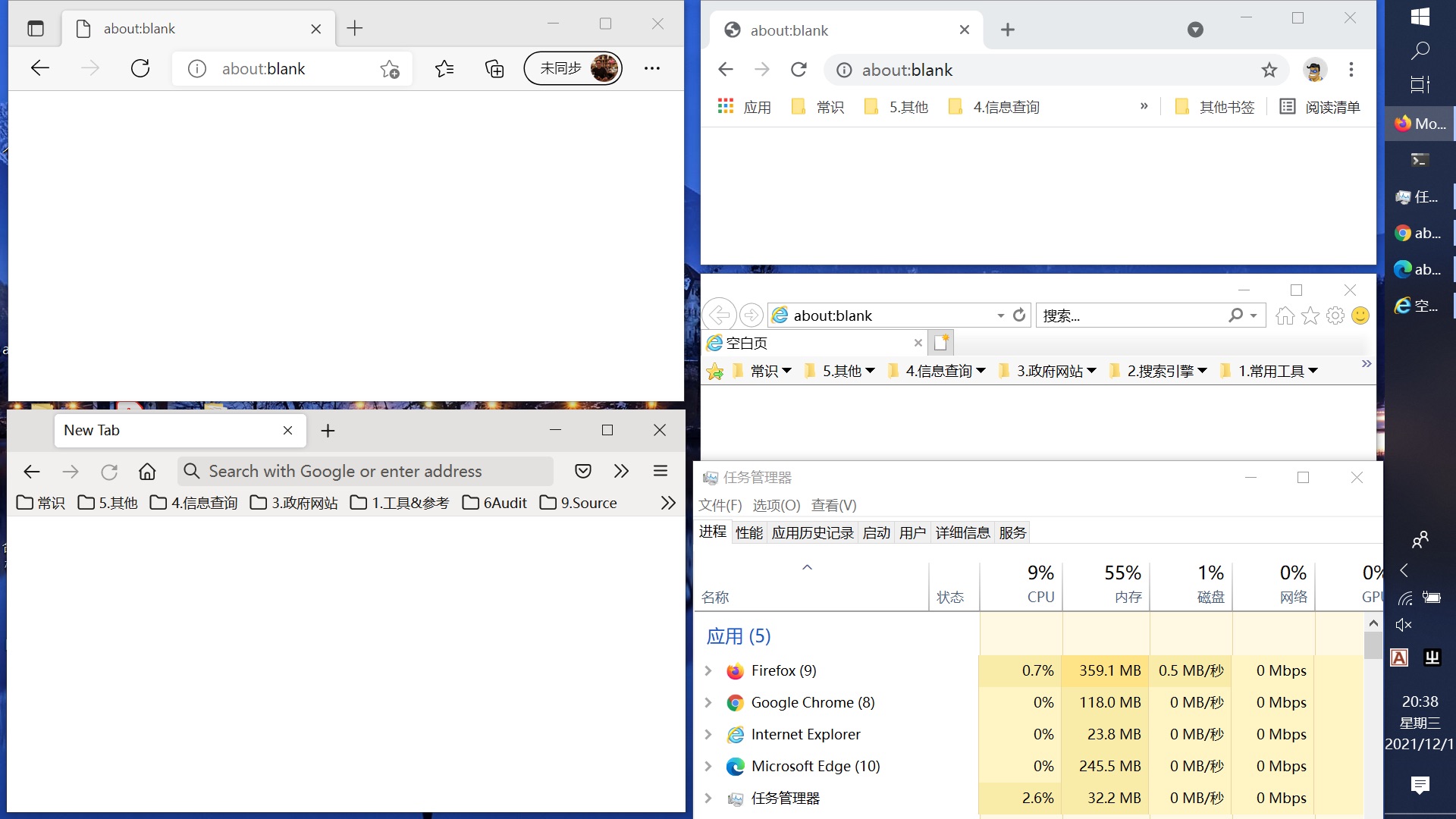
无意中看了下浏览器资源占用情况,好家伙,2GB 多。
之后对比了下扩展全关下,Firefox 、Chrome 、Edge 、IE 的资源占用,只能说,该加内存了。

IMG_8779.png

在浏览器里运行 Townscaper

Posted: 01 Dec 2021 09:46 AM PST

http://oskarstalberg.com/Townscaper/

Townscaper 在浏览器里的 demo ,原作是一款很不错的独立游戏:

https://store.steampowered.com/app/1291340/Townscaper/

分享一个无需定义结构体解析 json 的包

Posted: 01 Dec 2021 09:24 AM PST

说明

由于长期习惯 PHP 操作 json ,可以直接解析并静默处理异常返回一个默认值,不习惯 Go 需要先定义结构体再解析 json 的方式,于是有了此包。

使用示例

// 获取包:go get github.com/xing393939/jsonobject  jsonContent := `{"name":"John", "score":100}` jo := jsonobject.NewJsonObject(jsonContent) println(jo.GetString("name"), jo.GetInt("score"))  jsonContent = `[{"name":"John", "score":100}, {"name":"Tom", "score":200}]` jo = jsonobject.NewJsonObject(jsonContent) joArr := jo.GetJsonObjectSlice() for _, joRow := range joArr {     println(joRow.GetString("name"), joRow.GetInt("score")) } 

类方法说明

类方法是可变参数,如果不传参数,就表示把当前 JsonObject 对象转换成对应的 string 、int 、bool 等;如果传一个参数 arg 则表示获取当前 JsonObject 对象元素键名为 arg 的键值。

类方法 如果类型不匹配
GetString 返回空字符
GetInt 返回 0
GetBool 返回 false
GetInt64 返回 0
GetFloat64 返回 0
GetInt64 返回 0
GetJsonObject *
GetJsonObjectSlice 返回空切片

求助 想清理一下 Java 代码 ,哪个类,哪个方法没有使用到,有什么好工具推荐吗

Posted: 01 Dec 2021 08:31 AM PST

求大神推荐清理 java 代码好用的工具

8 折出售美亚购买的 googleplay gift card

Posted: 01 Dec 2021 08:16 AM PST

面值 25 刀,现在不到 8 折 120 元人民币出售。有美亚订单截图。注意:必须身在美国的朋友才能充值,爬梯用户不能兑换。联系方式 微信 号 geekbest

两台服务器,一台在内网做数据采集,另一台用做跳板机(可访问外网)转发内网采集的数据给外网的服务中。跳板机内用什么技术可以实现。

Posted: 01 Dec 2021 07:52 AM PST

以前没做过类似的功能,跳板机内用什么技术可以实现这种操作,另外跳板机要求做成可动态配置接受哪个内网 ip 的数据。

跳板机内搭建一个 springcloud gateway 可以做这种处理吗。。不太清楚。

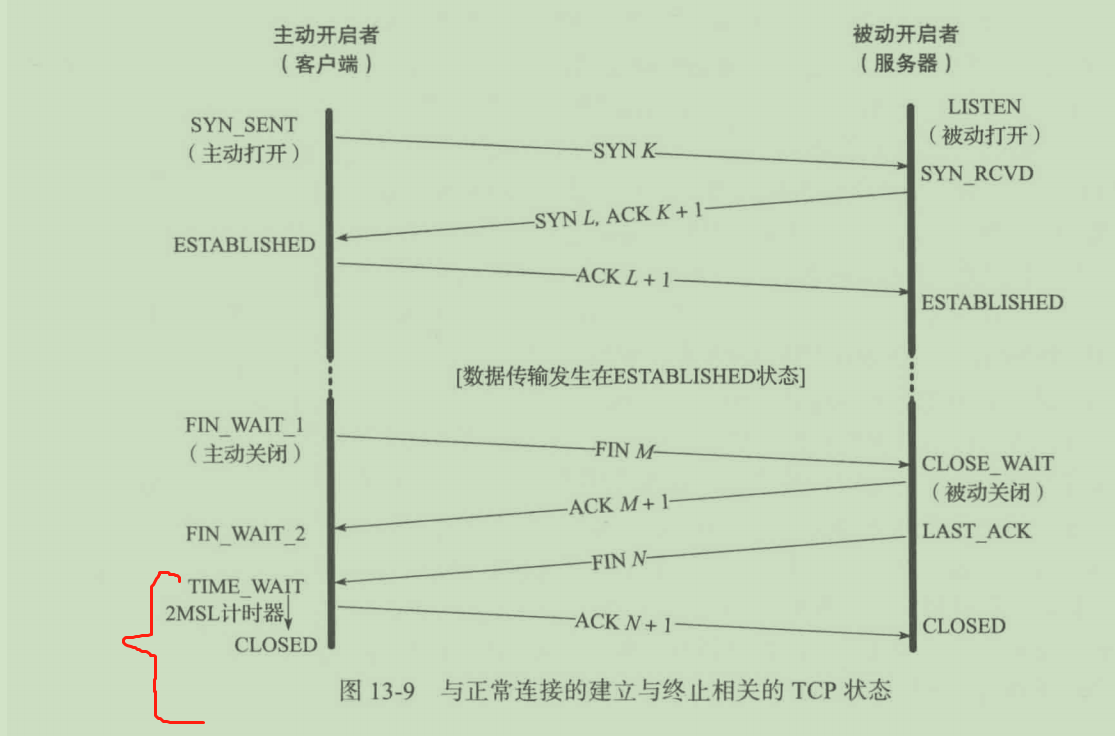
为什么 time_wait 状态要等两个 MSL,我咋觉得一个 MSL 就够了呢?

Posted: 01 Dec 2021 07:45 AM PST

首先四次挥手时,主动关闭方才会有 time_wait 状态。然后之所以要存在 time_wait 状态,(其中一个原因)就是因为有一些旧分组在网络中逗留,但我们需要 这个 tcp 连接的下一个实例 不会收到这些旧分组,让它们在网络被自然丢弃掉。

但是我觉得,好像只需要一个 MSL 不就行了吗,毕竟自己是主动关闭方,那网络中不就只存在 对方的一些旧分组在网络中徘徊,那只等待一个 MSL 不就行了吗

另外,2MSL > RTT ,这对吗

Elasticsearch 在生产环境单节点部署会有问题吗

Posted: 01 Dec 2021 07:35 AM PST

Elasticsearch 在生产环境单节点部署会不会自己莫名奇妙的崩溃?做的是一个外包项目,所以要考虑运维成本问题。只用来做全文检索,已知请求负载和文档数量不会太大

给 Marktext 打了个 Apple Silicon 的包

Posted: 01 Dec 2021 07:18 AM PST

开源的 Markdown 编辑器,跟 Typora 有些像: https://github.com/marktext/marktext

官方一直没有发布适配 M1 的版本,自己 clone 下来折腾了下,用自己的 ID 签了个名,把图标也改成了 Big Sur 风格。

Download here

如果你用的是 Intel 版本,只想要方形图标

npm install 报错,帮忙看看

Posted: 01 Dec 2021 07:00 AM PST

npm WARN deprecated @hapi/joi@15.1.1: Switch to 'npm install joi' npm WARN deprecated axios@0.18.1: Critical security vulnerability fixed in v0.21.1. For more information, see https://github.com/axios/axios/pull/3410 npm WARN deprecated svgo@1.2.2: This SVGO version is no longer supported. Upgrade to v2.x.x. npm WARN deprecated tar@2.2.2: This version of tar is no longer supported, and will not receive security updates. Please upgrade asap. npm WARN deprecated core-js@2.6.12: core-js@<3.3 is no longer maintained and not recommended for usage due to the number of issues. Because of the V8 engine whims, feature detection in old core-js versions could cause a slowdown up to 100x even if nothing is polyfilled. Please, upgrade your dependencies to the actual version of core-js. npm ERR! code 1 npm ERR! path E:\Vue\Vue8\OilStation-master\vue-OilStation\node_modules\node-sass npm ERR! command failed npm ERR! command C:\Windows\system32\cmd.exe /d /s /c node scripts/build.js npm ERR! Building: C:\Program Files\nodejs\node.exe E:\Vue\Vue8\OilStation-master\vue-OilStation\node_modules\node-gyp\bin\node-gyp.js rebuild --verbose --libsass_ext= --libsass_cflags= --libsass_ldflags= --libsass_library= npm ERR! gyp info it worked if it ends with ok npm ERR! gyp verb cli [ npm ERR! gyp verb cli   'C:\\Program Files\\nodejs\\node.exe', npm ERR! gyp verb cli   'E:\\Vue\\Vue8\\OilStation-master\\vue-OilStation\\node_modules\\node-gyp\\bin\\node-gyp.js', npm ERR! gyp verb cli   'rebuild', npm ERR! gyp verb cli   '--verbose', npm ERR! gyp verb cli   '--libsass_ext=', npm ERR! gyp verb cli   '--libsass_cflags=', npm ERR! gyp verb cli   '--libsass_ldflags=', npm ERR! gyp verb cli   '--libsass_library=' npm ERR! gyp verb cli ] npm ERR! gyp info using node-gyp@3.8.0 npm ERR! gyp info using node@16.13.0 | win32 | x64 npm ERR! gyp verb command rebuild [] npm ERR! gyp verb command clean [] npm ERR! gyp verb clean removing "build" directory npm ERR! gyp verb command configure [] npm ERR! gyp verb check python checking for Python executable "python2" in the PATH npm ERR! gyp verb `which` failed Error: not found: python2 npm ERR! gyp verb `which` failed     at getNotFoundError (E:\Vue\Vue8\OilStation-master\vue-OilStation\node_modules\which\which.js:13:12) npm ERR! gyp verb `which` failed     at F (E:\Vue\Vue8\OilStation-master\vue-OilStation\node_modules\which\which.js:68:19) npm ERR! gyp verb `which` failed     at E (E:\Vue\Vue8\OilStation-master\vue-OilStation\node_modules\which\which.js:80:29) npm ERR! gyp verb `which` failed     at E:\Vue\Vue8\OilStation-master\vue-OilStation\node_modules\which\which.js:89:16 npm ERR! gyp verb `which` failed     at E:\Vue\Vue8\OilStation-master\vue-OilStation\node_modules\isexe\index.js:42:5 npm ERR! gyp verb `which` failed     at E:\Vue\Vue8\OilStation-master\vue-OilStation\node_modules\isexe\windows.js:36:5 npm ERR! gyp verb `which` failed     at FSReqCallback.oncomplete (node:fs:198:21) npm ERR! gyp verb `which` failed  python2 Error: not found: python2 npm ERR! gyp verb `which` failed     at getNotFoundError (E:\Vue\Vue8\OilStation-master\vue-OilStation\node_modules\which\which.js:13:12) npm ERR! gyp verb `which` failed     at F (E:\Vue\Vue8\OilStation-master\vue-OilStation\node_modules\which\which.js:68:19) npm ERR! gyp verb `which` failed     at E (E:\Vue\Vue8\OilStation-master\vue-OilStation\node_modules\which\which.js:80:29) npm ERR! gyp verb `which` failed     at E:\Vue\Vue8\OilStation-master\vue-OilStation\node_modules\which\which.js:89:16 npm ERR! gyp verb `which` failed     at E:\Vue\Vue8\OilStation-master\vue-OilStation\node_modules\isexe\index.js:42:5 npm ERR! gyp verb `which` failed     at E:\Vue\Vue8\OilStation-master\vue-OilStation\node_modules\isexe\windows.js:36:5 npm ERR! gyp verb `which` failed     at FSReqCallback.oncomplete (node:fs:198:21) { npm ERR! gyp verb `which` failed   code: 'ENOENT' npm ERR! gyp verb `which` failed } npm ERR! gyp verb check python checking for Python executable "python" in the PATH npm ERR! gyp verb `which` failed Error: not found: python npm ERR! gyp verb `which` failed     at getNotFoundError (E:\Vue\Vue8\OilStation-master\vue-OilStation\node_modules\which\which.js:13:12) npm ERR! gyp verb `which` failed     at F (E:\Vue\Vue8\OilStation-master\vue-OilStation\node_modules\which\which.js:68:19) npm ERR! gyp verb `which` failed     at E (E:\Vue\Vue8\OilStation-master\vue-OilStation\node_modules\which\which.js:80:29) npm ERR! gyp verb `which` failed     at E:\Vue\Vue8\OilStation-master\vue-OilStation\node_modules\which\which.js:89:16 npm ERR! gyp verb `which` failed     at E:\Vue\Vue8\OilStation-master\vue-OilStation\node_modules\isexe\index.js:42:5 npm ERR! gyp verb `which` failed     at E:\Vue\Vue8\OilStation-master\vue-OilStation\node_modules\isexe\windows.js:36:5 npm ERR! gyp verb `which` failed     at FSReqCallback.oncomplete (node:fs:198:21) npm ERR! gyp verb `which` failed  python Error: not found: python npm ERR! gyp verb `which` failed     at getNotFoundError (E:\Vue\Vue8\OilStation-master\vue-OilStation\node_modules\which\which.js:13:12) npm ERR! gyp verb `which` failed     at F (E:\Vue\Vue8\OilStation-master\vue-OilStation\node_modules\which\which.js:68:19) npm ERR! gyp verb `which` failed     at E (E:\Vue\Vue8\OilStation-master\vue-OilStation\node_modules\which\which.js:80:29) npm ERR! gyp verb `which` failed     at E:\Vue\Vue8\OilStation-master\vue-OilStation\node_modules\which\which.js:89:16 npm ERR! gyp verb `which` failed     at E:\Vue\Vue8\OilStation-master\vue-OilStation\node_modules\isexe\index.js:42:5 npm ERR! gyp verb `which` failed     at E:\Vue\Vue8\OilStation-master\vue-OilStation\node_modules\isexe\windows.js:36:5 npm ERR! gyp verb `which` failed     at FSReqCallback.oncomplete (node:fs:198:21) { npm ERR! gyp verb `which` failed   code: 'ENOENT' npm ERR! gyp verb `which` failed } npm ERR! gyp verb could not find "python". checking python launcher npm ERR! gyp verb could not find "python". guessing location npm ERR! gyp verb ensuring that file exists: C:\Python27\python.exe npm ERR! gyp ERR! configure error npm ERR! gyp ERR! stack Error: Can't find Python executable "python", you can set the PYTHON env variable. npm ERR! gyp ERR! stack     at PythonFinder.failNoPython (E:\Vue\Vue8\OilStation-master\vue-OilStation\node_modules\node-gyp\lib\configure.js:484:19) npm ERR! gyp ERR! stack     at PythonFinder.<anonymous> (E:\Vue\Vue8\OilStation-master\vue-OilStation\node_modules\node-gyp\lib\configure.js:509:16) npm ERR! gyp ERR! stack     at callback (E:\Vue\Vue8\OilStation-master\vue-OilStation\node_modules\graceful-fs\polyfills.js:299:20) npm ERR! gyp ERR! stack     at FSReqCallback.oncomplete (node:fs:198:21) npm ERR! gyp ERR! System Windows_NT 10.0.22000 npm ERR! gyp ERR! command "C:\\Program Files\\nodejs\\node.exe" "E:\\Vue\\Vue8\\OilStation-master\\vue-OilStation\\node_modules\\node-gyp\\bin\\node-gyp.js" "rebuild" "--verbose" "--libsass_ext=" "--libsass_cflags=" "--libsass_ldflags=" "--libsass_library=" npm ERR! gyp ERR! cwd E:\Vue\Vue8\OilStation-master\vue-OilStation\node_modules\node-sass npm ERR! gyp ERR! node -v v16.13.0 npm ERR! gyp ERR! node-gyp -v v3.8.0 npm ERR! gyp ERR! not ok npm ERR! Build failed with error code: 1  npm ERR! A complete log of this run can be found in: npm ERR!     C:\Users\longzhang\AppData\Local\npm-cache\_logs\2021-12-01T14_31_12_588Z-debug.log 

OneDrive 在 Win10 上每天都会弹出一个什么查看记忆的通知,这个能关么

Posted: 01 Dec 2021 06:50 AM PST

没找到 OneDrive 的设置里哪里关,Windows 也没法只关这一个通知,网上搜了搜好像也没人说这问题,有解吗朋友们

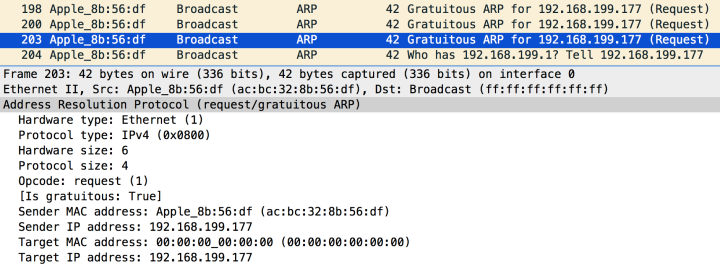
免费 ARP 的分组, request 和 reply 的分组在使用有什么区别?

Posted: 01 Dec 2021 04:30 AM PST

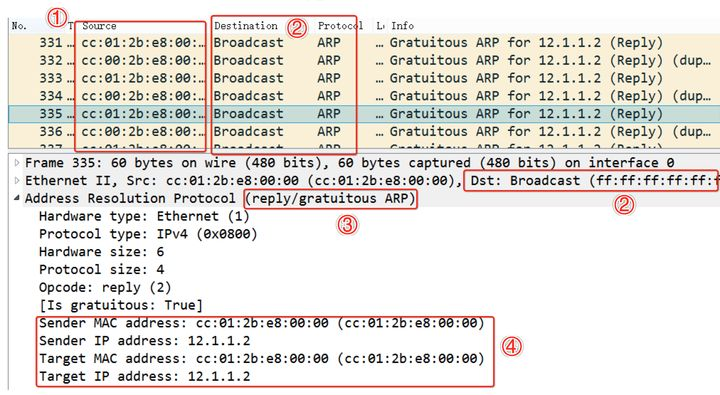
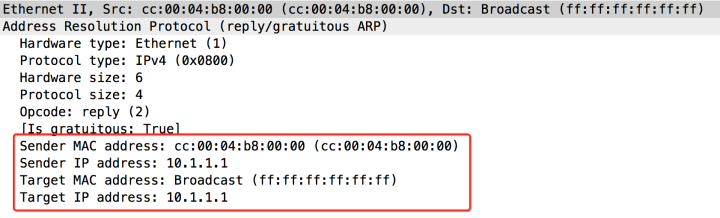
https://www.zhihu.com/question/64514922/answer/221264172

这篇文章我看到了三种 免费 ARP 报文,它们的共同点是

  • arp 协议的字段里,目的 ip 和 源 ip 都是一样的(这就是 免费 arp 的定义)
  • 以太网帧的 目的 mac 地址,都是 广播 mac 地址

但是这三个 免费 ARP 报文 还各不相同:

这是一个 reply 的 免费 ARP 报文,ARP 字段的目的 mac 和源一样

这是一个 reply 的免费 ARP 报文,ARP 字段的目的 mac 是全 1

这是一个 request 的 免费 ARP 报文,ARP 字段的目的 mac 是全 0 (比如,我猜这个是在机器开机的时候使用,查看自己的 ip 地址有没有被别的机器抢占)

所以这三种 免费 ARP 报文 是分别在什么时候使用?(虽然这个问题不重要可能,但还是想问一下)

安装 k8s,兼容 docker 是否可行?

Posted: 01 Dec 2021 04:08 AM PST

服务器上之前安装了 docker ,现在想使用 containerd 容器安装 kubernetes ,安装完 k8s 后不影响原来的 docker 使用

从 mac 切换 win 的一天

Posted: 01 Dec 2021 02:20 AM PST

切换原因: https://v2ex.com/t/818920#reply7 键盘挂了 要修两天
所以今天是使用了 hhkb + windows 高强度摸鱼+开发了一整天
具体的体验:
1. 工作流 idea 因为我的 keybinding 都是基于 ideavim 的 例如 <leader>f 全局搜索 <leader>tp 上一个 tab
基本上跟系统级的快捷键没啥关系 所以基本体验一致
2. 网页浏览 编辑 surfingkeys 基本一致
3. 聊天 或者普通的文本编辑 由于失去了 mac 自带的 emacs 快捷键 只能使用 hhkb 组合方向键 所以体验有点下降
4. ctrl 在 vim 模式上 会有一定的冲突 所以会禁用掉部分的 ctrl 快捷键
5. terminal 目前是使用的 wsl ubuntu + git bash 暂时还没感觉到有不适的地方
6. ui 感觉还是喜欢 mac 的 这个属于个人喜好问题吧 非黑
7.应用内切换丢失 有点不习惯 但是 alt tab 也可以适应 还在寻找一个快速切换窗口的方法
比如说我的 ide 开了 a b c d 项目名的窗口 输入 a 可以立马切换到 a 窗口
8. mac Alfred win utool alt space 跟 cmd space 对上了 就是里面的黑魔法脚本还没来得及去找
9.字体方案使用 noMeiryoUI + 苹方 感觉还行
10. 待补充。。
---------------

切换的感觉我觉得还行,
主要还是办公室的 1080p 显示屏太辣了。。。字体真的不好看 当然接 mac 肯定也是又虚又糊
ui 我觉得见仁见智吧我是比较喜欢果子的,win 的硬朗一点。
关于操作习惯,我觉得之前看过 v2 老哥说过的,
不要尝试把两个系统的习惯融合,最好就是自带两套方案,换了电脑脑子也换一下,缩短阵痛期
暂时想不到说啥了 果子突然打电话说修好了 下班取电脑去了 hahaha